
CUDA Programming Tutorial #2
This blog post contains notes I wrote while following the CUDA tutorial from Nvidia’s developer blog. Detailed code is omitted here.
Optimizing Data Transfers in CUDA C/C++
Data transfer is often the bottleneck of executing GPU code. This tutorial shares some general tips on how to minimize the memory bottleneck.
-
General guidelines for host-device data transfers
-
Minimize data transfers if possible
-
Batch small transfers
-
Use pinned host memory when necessary
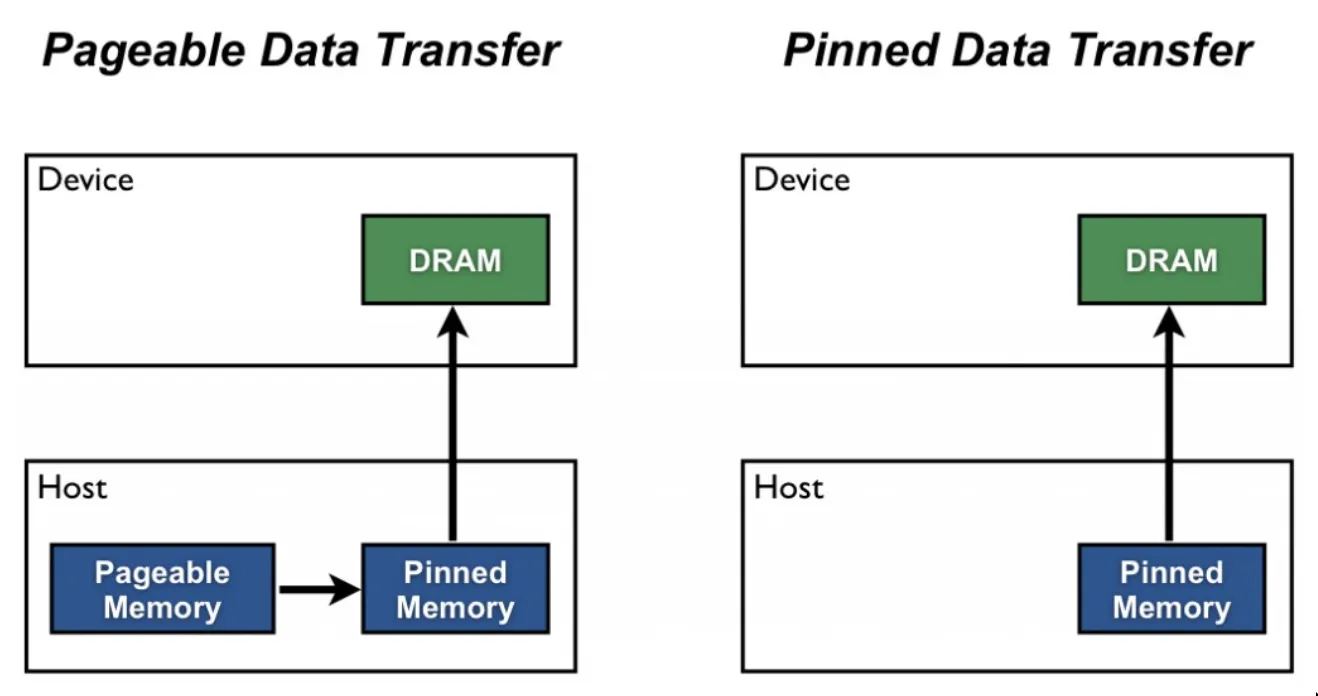
Data allocated in pageable memory must be transferred to host pinned memory before moving to the GPU. Why not directly allocate data in pinned memory?
-
-
Pageable vs. Pinned Memory
Pageable memory is the regular memory on the CPU, and is controlled by the OS. Data can be paged-out, which means that the physical location of data can be moved, e.g., from the DRAM to the disk, if its priority is lower than others.
Pinned memory is a special host storage where the physical location of data does not change once data is allocated. Once data is located in the pinned memory, the GPU’s DMA (direct memroy access) engine transfers data between the host and device.
Before moving data between the host and device, we need to ensure the physical address does not change. This is why data must first be placed in the pinned memory on the host, before the host 2 device transfer. If the host data is initially in pageable memory (the case when using
cudaMemcpy), the CUDA API performs a pageable-to-pinned memory transfer behind the scenes into a staging buffer before the GPU’s DMA engine transfers it into the device. Alternatively, data can be directly allocated in pinned memory by the programmer, (the case when usingcudaMallocHost), which is more efficient because it doesn’t require an intermediate staging copy. -
Direct memory access (DMA)
Direct memory access (DMA) is an instrument for hardware subsystems to access memory without direct intervention from the CPU. The CPU is notified with interrupts after all memory access is finished.
When we use CUDA API calls, the CUDA runtime/driver calls the GPU’s DMA engine to initiate memory transfer.
Overlapping Data Transfers with Streams
- CUDA Streams
CUDA streams are logical queues of a sequence of operations that the CPU issues to the GPU. Operations enqueued in a single stream are guaranteed to execute in order. Issuing multiple, independent streams, however, allows the GPU to achieve concurrency by executing kernels from different streams simultaneously, for example, data-transfer operations and kernel operations.
They are a logical abstraction for organizing work, and it’s not that they are assigned their own dedicated physical resources like SMs. Instead, the GPU’s hardware scheduler assigns work units from any ready stream to the shared pool of available SMs and copy engines. Therefore, the efficiency gains from using multiple streams stem from providing the GPU scheduler with more opportunities to keep its physical executioin busy, while the fundamental way an individual kernel’s thread blocks executes remains the same.
The default stream is the go-to stream when nothing else is specified. They are like synchronization captains, as they do not start next tasks before all other streams have finished, and must finish their task before the others can begin. Non-default streams can also be created, and require an additional argument for the key function calls.
-
An analogy..
Default stream 은 synchronization 반장 같은 역할이다. 다른 Stream 친구들이 끝날때까지 다음 operation 으로 넘어가지 않고, 자기 operation 을 먼저 끝내야지 다른 stream 친구들이 작업을 시작할 수 있다.
/////////////// Default Stream /////////////////
cudaMemcpy(d_a, a, numBytes, cudaMemcpyHostToDevice);

/////////////// Non-default Stream /////////////////
cudaStream_t stream1;
cudaError_t result;
result = cudaStreamCreate(&stream1); // creating
result = cudaStreamDestroy(&stream1); // destroying
result = cudaMemcpyAsync(d_a, a, N, cudaMemcpyHostToDevice, stream1)
increment<<<1,N,0,stream1>>>(d_a); // specifiy stream number as kernel launch arg- Overlapping
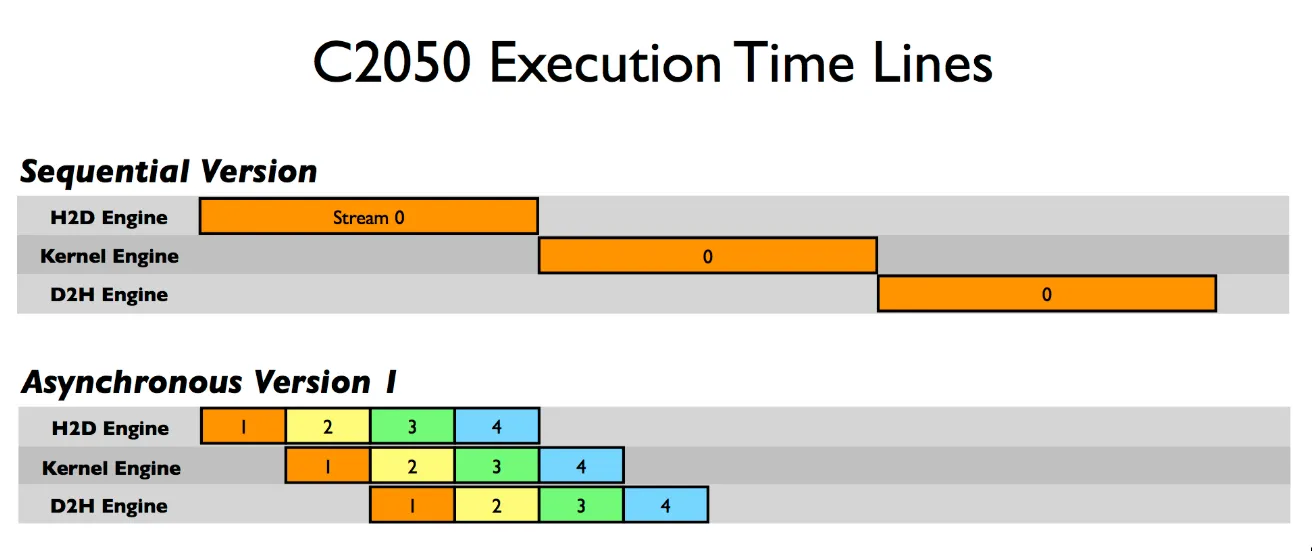
We can achieve concurrency if we overlap kernel code and host-device data transfers. Some requirements for this include the following:
- Kernel execution and data transers must take place in different non-default streams.
- The host memory invovled in data transfer must be pinned (page-locked) memory.
Here is an example of using multiple cuda streams. The optimal style of code may differ depending on the architecture, as they have different styles of handling data transfer.
for (int i = 0; i < nStreams; ++i) {
  int offset = i * streamSize;
  cudaMemcpyAsync(&d_a[offset], &a[offset], streamBytes, cudaMemcpyHostToDevice, stream[i]);
  kernel<<<streamSize/blockSize, blockSize, 0, stream[i]>>>(d_a, offset);
  cudaMemcpyAsync(&a[offset], &d_a[offset], streamBytes, cudaMemcpyDeviceToHost, stream[i]);
}
- Caution
- When writing library code, you need to use non-default streams or per-thread default streams because if the library uses the default stream, there is no way for the end-user to make use of data stream overlaps.
- Per-thread default streams have been introduced in later architectures, where each host thread (which can be created using the
pthreadlibrary) has its own default stream by default.